Google’s Gemini Deep Research tool just got an upgrade that gives it open access to your private emails in Gmail, documents in Drive, and conversations in Chat. The move has sparked a mix of confusion, curiosity, and outrage as users online question why Gemini should have the power to scour private files. At first glance, the story is enough to make your hackles stand up on end, but the truth is a little more convoluted than the mass invasion of privacy it seems to be.
Actually, Gemini has had access to your personal files since 2024! But you can stop it and sever the tie for good.
Google certainly has access to your content, and the company can even leverage it against you.
What is Gemini Deep Research?
Before we go any farther, let’s get a few things out of the way.
- Google launched Gemini Deep Research back in December 2024 for Gemini Advanced subscribers (later renamed to Google AI Pro, as it stands today). The feature gave users the power to have Gemini research various topics online and pull together reports with detailed information and analysis, all with a simple command prompt. This was an early form of agentic AI, an AI tool that completes tasks all on its own like an assistant or an intern, freeing users to spend their time on other tasks.
- Fast-forward to November 2025. Gemini Deep Research just received an upgrade that gave it access to users’ private Gmail, Drive, and Chat data. So now, instead of simply searching the internet for deep research data, it can now pull information from your documents, too. Keep in mind that Deep Research only accesses your content if you enable this feature in a Gemini prompt. Otherwise, it will pull data strictly from the web.
- Although Gemini Deep Research was just given the ability to access users’ private documents in Google Workspace apps (Gmail, Drive, Docs, Slides, Sheets, Meet) on request, Gemini’s core AI service has had access to personal documents since September 2024. Although Gemini Deep Research may be more thorough at scouring your files, Gemini has been able to scan through them (on request) since last year!
Is Google spying on your personal data?
Now that you know Gemini can see your files, you might wonder if Google is spying on your personal data. The answer is a little complicated.
According to Google’s privacy policy, “we use automated systems that analyze your content to provide you with things like customized search results, personalized ads, or other features tailored to how you use our services. And we analyze your content to help us detect abuse such as spam, malware, and illegal content. We also use algorithms to recognize patterns in data.”
The word “automated” is important here. While a real person at Google isn’t poring through your files in search of information, your content is automatically scanned by Google’s systems. In some cases, Google will even turn over your personal data in response to formal requests from law enforcement. In other words, Google can access your files whenever needed, but the company claims to stay out unless legally compelled.
As for Gemini, it collects a ton of data as well, including the content you create with Gemini, as well as the content you feed into the platform through connected apps, like Gmail, Drive, YouTube, Chrome, etc. If there’s any bit of good news, it’s that Google won’t use your content to train the LLMs that power Gemini or any other AI model in the Google ecosystem. This means that your private files can’t be fed into Gemini’s database and used to answer queries from other users.
RELATED: BEWARE: With these new web browsers, everything on your computer can be stolen with one click
 Photo Credit: Bill Hinton via Getty Images
Looking at the facts as a whole, Google isn’t spying on users, per se, but the company certainly has access to your content, and it can even leverage it against you if any uploaded materials are complicit in a legal matter or if said material is deemed illegal itself.
How to disconnect Gemini from Google Drive, Gmail, and more
By most available evidence, Google isn’t using Gemini to scan your private data any more than the company already does for its ad network, services, and law requests. However, if you still want to cut Gemini off from endless supplies of personal information, here’s what you need to do:
- In your web browser, head over to Gmail.
- Click on the Settings gear in the top right corner.
- From the popup menu, click “See all settings.”
- Now that you’re in the Settings page, scroll down to the section that says “Google Workspace smart features.” This is the setting that gives Gemini direct access to your content.
- Click on “Manage Workspace smart feature settings.
- Uncheck “Smart features in Google Workspace” and “Smart features in other Google products.”
- Save, and you’re all done.
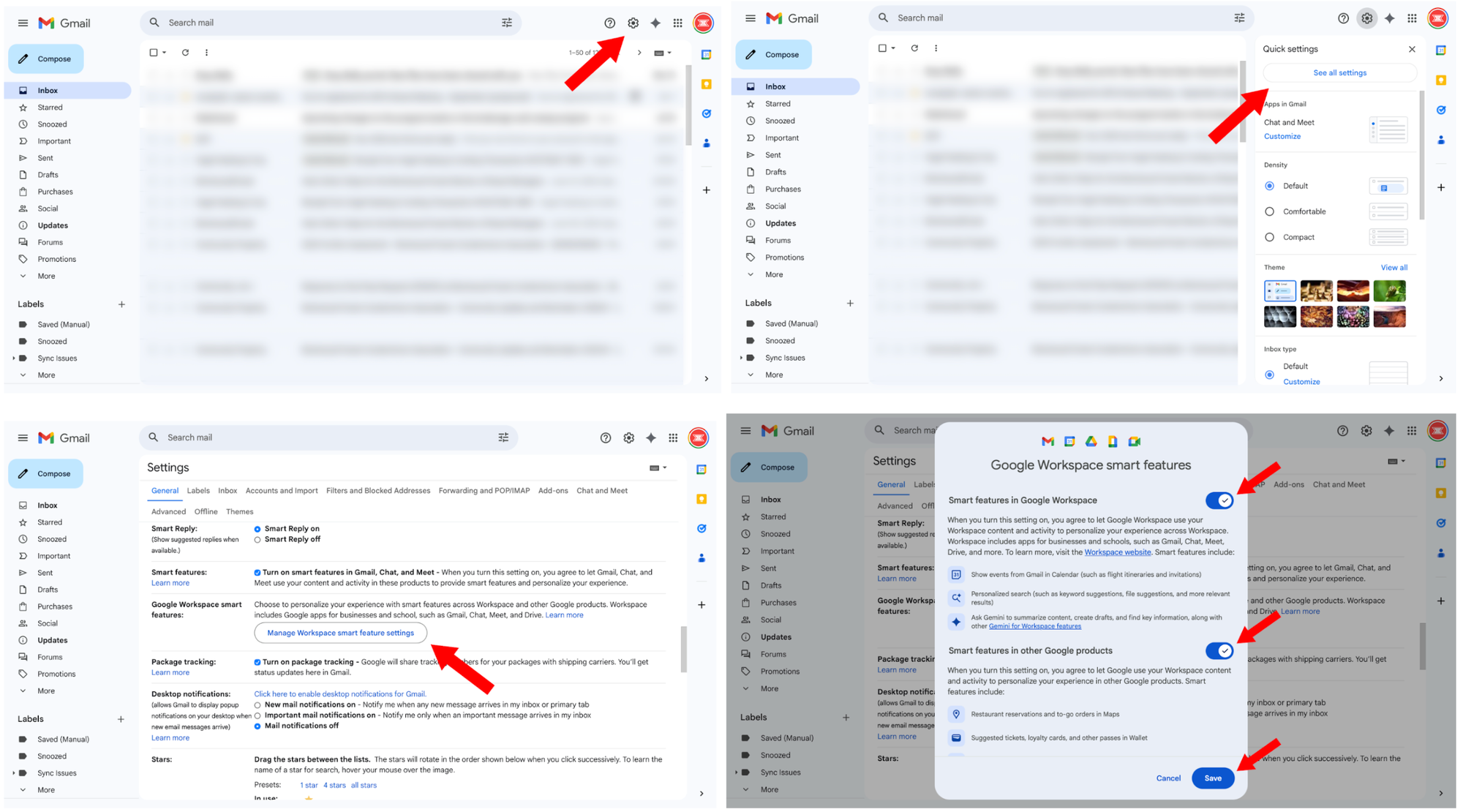 Four quick steps will free you from Gemini’s prying eyes.Screenshots by Zach Laidlaw
Now that you’ve disconnected Gemini from your content, you can do the same thing for all of Google’s apps and services with just a few clicks.
- Go back to the Settings page in Gmail.
- Find “Smart features.”
- Uncheck the blue box, and you’re all set.
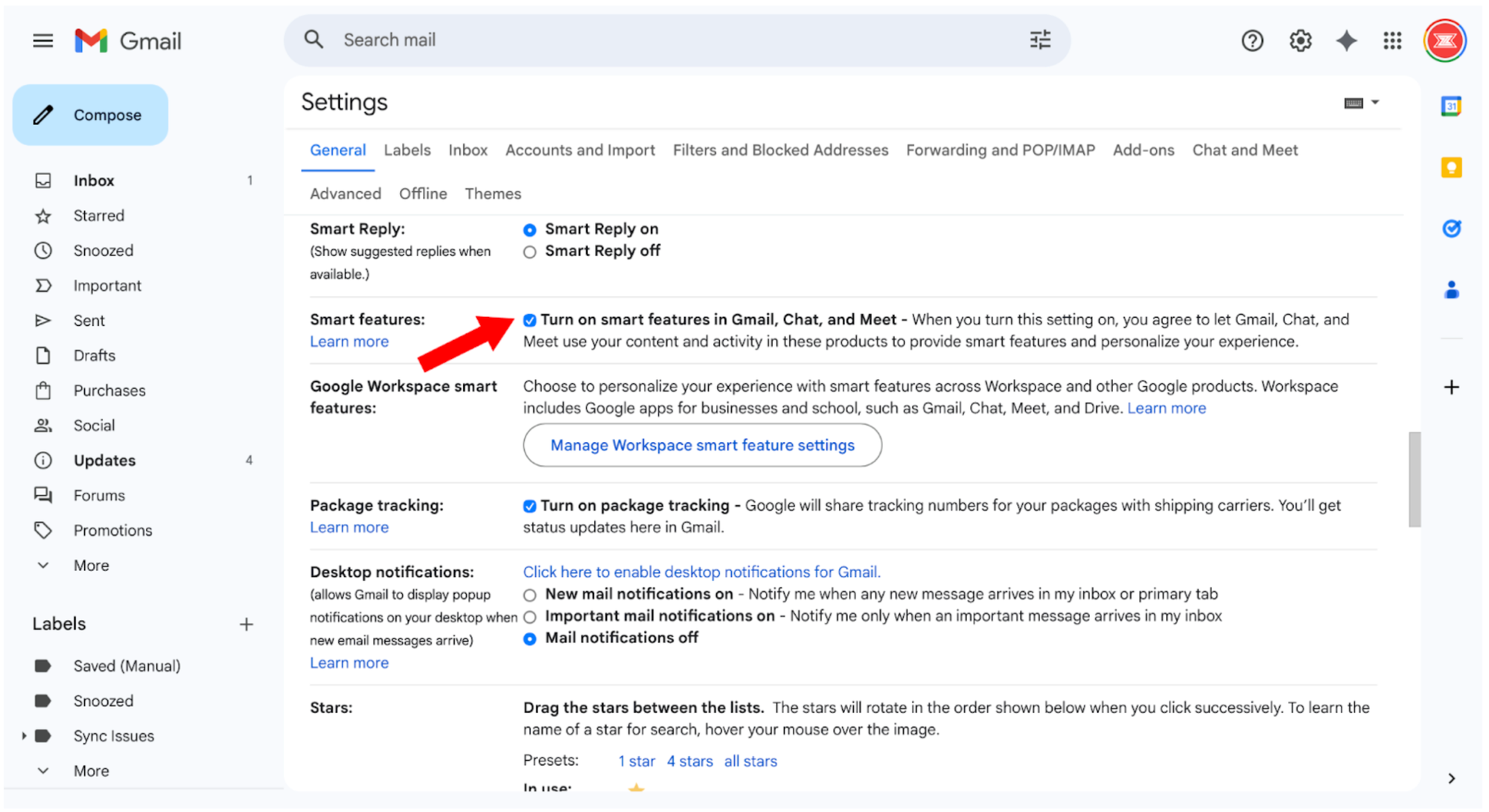 One check, total coverage.Screenshot by Zach Laidlaw
There’s only one way to get Google out of your data for good
Although you can keep Google’s apps, services, and Gemini out of your personal files, Google can still scan everything you throw into Drive, Gmail, and more. The best way to kick Google to the curb for good is to move your files out of Google’s ecosystem entirely.
The most private and secure way to save your data is to keep it on a local hard drive at home. This way, no cloud storage providers can access your content but you. There’s also a way to set up your own private cloud network so that you can still access your files remotely within your local hard drive, just as you do with Google Drive.
Otherwise, there are several cloud storage services that claim to be completely private. The leading option is Proton Drive (from the markers of the private email service Proton Mail). It leverages end-to-end, zero-access encryption to protect your data and stay out of your business. Another option is Sync.com, which uses end-to-end encryption and zero-knowledge authentication to keep your private files private.
Your data belongs to you, but unless your AI, cloud storage, and email providers have strict guidelines to protect your privacy, your data is open and accessible for all manner of reasons. Even worse, you agree to let them scan your content from the moment you create an account. This is why it’s a good idea to research the tools you use online, and always read the terms and conditions before you sign up. The integrity of your personal data and privacy depend on it.